Today 1 in 5 consumer PCs is a Mac so they are a tasty target for hackers, spammers and criminals.
See these two brief videos for more info: Do Macs get viruses?
and this: What does a Mac threat look like?
Showing posts with label spyware. Show all posts
Showing posts with label spyware. Show all posts
Thursday, November 4, 2010


Wednesday, November 3, 2010
Free Anti virus protection for Macs
Introducing Sophos Anti-Virus for Mac Home Edition
Sophos has released their latest free tool - Sophos Anti-Virus for Mac Home Edition. This is their first consumer anti-malware product designed to provide Mac home users with up–to-the-hour protection that is simple to use and FREE!
Sophos Anti-Virus for Mac Home Edition features:
• Full protection from viruses, Trojans and worms— both Mac and Windows threats
• Anti-virus technology that stops all threats in their tracks, even if it’s something new
• Quarantine and cleanup of threats it finds
• Business-quality anti-virus, backed by SophosLabs
• Protection that is light on resources and easy to use - it installs quickly and doesn’t get in your way
• And yes, it’s 100%, totally, absolutely, completely free
Sophos Anti-Virus for Mac Home Edition is available for Mac OSX 10.4 (Tiger), 10.5 (Leopard) or 10.6 (Snow Leopard), and supports all Apple Mac hardware including the new MacBook Air.
To downlad it free, go to www.sophos.com/products/free-tools/free-mac-anti-virus/
B Technologies is a Gold partner of Sophos so far any security needs, write to us at info@btechnologies.com and we will get back to you promptly.
Sophos has released their latest free tool - Sophos Anti-Virus for Mac Home Edition. This is their first consumer anti-malware product designed to provide Mac home users with up–to-the-hour protection that is simple to use and FREE!
Sophos Anti-Virus for Mac Home Edition features:
• Full protection from viruses, Trojans and worms— both Mac and Windows threats
• Anti-virus technology that stops all threats in their tracks, even if it’s something new
• Quarantine and cleanup of threats it finds
• Business-quality anti-virus, backed by SophosLabs
• Protection that is light on resources and easy to use - it installs quickly and doesn’t get in your way
• And yes, it’s 100%, totally, absolutely, completely free
Sophos Anti-Virus for Mac Home Edition is available for Mac OSX 10.4 (Tiger), 10.5 (Leopard) or 10.6 (Snow Leopard), and supports all Apple Mac hardware including the new MacBook Air.
To downlad it free, go to www.sophos.com/products/free-tools/free-mac-anti-virus/
B Technologies is a Gold partner of Sophos so far any security needs, write to us at info@btechnologies.com and we will get back to you promptly.
Monday, March 1, 2010
SCAMS - Learn All About Them
Too many businesses become victims of online and offline scams. There is a handy booklet published by the government that you are able to download for free and learn more about the scams, how they work and how you can defend against them.
The link is as follows:
http://www.accc.gov.au/content/index.phtml/tag/TheLittleBlackBookOfScams08
This is what the website says about the booklet:
The little black book of scams highlights a variety of popular scams that regularly target Australian consumers and small business in areas such as fake lotteries, internet shopping, mobile phones, online banking, employment and investment opportunities. It also offers consumers tips on how to protect themselves from scams, what they can do to minimise damage if they do get scammed and how they can report a scam.
The link is as follows:
http://www.accc.gov.au/content/index.phtml/tag/TheLittleBlackBookOfScams08
This is what the website says about the booklet:
The little black book of scams highlights a variety of popular scams that regularly target Australian consumers and small business in areas such as fake lotteries, internet shopping, mobile phones, online banking, employment and investment opportunities. It also offers consumers tips on how to protect themselves from scams, what they can do to minimise damage if they do get scammed and how they can report a scam.
Wednesday, January 20, 2010
How to get rid of a common and current vicious virus
We are getting a lot of calls about a vicious virus that is getting through most of the popular anti virus programs.
As always, we have the answer so the way to deal with this is as follows:
1. Go to http://www.download.com/
2. In the search box on this site type Malwarebytes and click Search
3. In the list of search results, find Malwarebytes Anti-Malware (probably the first in the list)
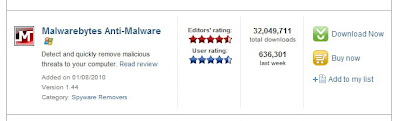
4. Click on Download now
5. In the following screen if the file download doesn’t automatically pop up, click on click here to try again

6. Click Save and save the file to your Desktop (or somewhere where you can find it later)
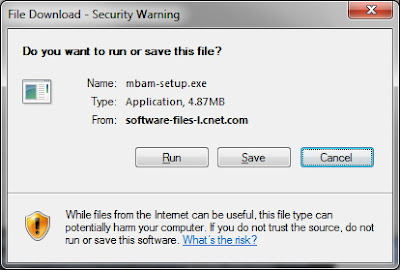
7. Once downloaded, go to your Desktop (or wherever you saved the file) and double-click mbam-setup.exe
8. Follow the prompts to install the software
9. Once installed, the software will place an icon on your Desktop, double-click this to start Malwarebytes Anti-Malware

10. Click on the Update tab and update the software
11. Once the software has been updated, restart your computer in Safe Mode. To do this, follow the steps below:
a. Restart your computer
b. When the screen goes black, and then your computer comes to life again, start slowly tapping on the F8 key – do not hold the key down, just tap tap tap on it until you see a menu appear with some startup options
c. Use the arrow keys on your keyboard to select Safe Mode and then press Enter. You may also then be asked which operating system to start. Generally, there is only one but if not, choose the one with the problem from the list and press Enter
d. If you have a login screen, login to your computer as normal (you may have to log on as the Administrator user)
e. When you see a warning for safe mode, click Yes
12. Double-click the icon on the desktop for Malwarebytes Anti-Malware
13. Click the button to perform a Full Scan
14. When the scan is complete, remove all threats found
15. Exit Malwarebytes Anti-Malware and perform a full scan using your up-to-date anti-virus software. If you don’t have an up-to-date anti-virus software, you should get one as soon as possible to prevent any further viruses.
16. Restart your computer in normal mode and hopefully the threat has been removed.
For tips on how to avoid viruses, see our earlier post here: http://btechnologies.blogspot.com/2009/02/protect-yourself-from-dangerous-virus.html
As always, we have the answer so the way to deal with this is as follows:
1. Go to http://www.download.com/
2. In the search box on this site type Malwarebytes and click Search
3. In the list of search results, find Malwarebytes Anti-Malware (probably the first in the list)

4. Click on Download now
5. In the following screen if the file download doesn’t automatically pop up, click on click here to try again

6. Click Save and save the file to your Desktop (or somewhere where you can find it later)

7. Once downloaded, go to your Desktop (or wherever you saved the file) and double-click mbam-setup.exe
8. Follow the prompts to install the software
9. Once installed, the software will place an icon on your Desktop, double-click this to start Malwarebytes Anti-Malware

10. Click on the Update tab and update the software
11. Once the software has been updated, restart your computer in Safe Mode. To do this, follow the steps below:
a. Restart your computer
b. When the screen goes black, and then your computer comes to life again, start slowly tapping on the F8 key – do not hold the key down, just tap tap tap on it until you see a menu appear with some startup options
c. Use the arrow keys on your keyboard to select Safe Mode and then press Enter. You may also then be asked which operating system to start. Generally, there is only one but if not, choose the one with the problem from the list and press Enter
d. If you have a login screen, login to your computer as normal (you may have to log on as the Administrator user)
e. When you see a warning for safe mode, click Yes
12. Double-click the icon on the desktop for Malwarebytes Anti-Malware
13. Click the button to perform a Full Scan
14. When the scan is complete, remove all threats found
15. Exit Malwarebytes Anti-Malware and perform a full scan using your up-to-date anti-virus software. If you don’t have an up-to-date anti-virus software, you should get one as soon as possible to prevent any further viruses.
16. Restart your computer in normal mode and hopefully the threat has been removed.
Wednesday, November 5, 2008
Free Anti-Virus and Spyware protection for Home use
In this day and age with all the threats posed by connecting your PC or laptop to the Internet, you can not afford not to have up to date Anti-Virus and Spyware protection.
There are many products available on the market but a great free tool that offers the basic level of protection that you are looking for for a home setting is AVG's free product which you can download from their own site.
In their own words this product has more than 2 million active users in Australia and over 80 million users worldwide, making AVG Anti-Virus Free Edition the best and most popular FREE protection currently available.
If you decide to download and use this product for your home use, make sure you regularly download the updates that are available or set the program to download them automatically for you, and also you should run a full system scan with the AVG program at least once a month, but if you are doing a lot of internet searches, you will probably want to perform the scan more frequently.
We invite you to visit our website at www.BTechnologies.com
There are many products available on the market but a great free tool that offers the basic level of protection that you are looking for for a home setting is AVG's free product which you can download from their own site.
In their own words this product has more than 2 million active users in Australia and over 80 million users worldwide, making AVG Anti-Virus Free Edition the best and most popular FREE protection currently available.
If you decide to download and use this product for your home use, make sure you regularly download the updates that are available or set the program to download them automatically for you, and also you should run a full system scan with the AVG program at least once a month, but if you are doing a lot of internet searches, you will probably want to perform the scan more frequently.
We invite you to visit our website at www.BTechnologies.com
Subscribe to:
Posts (Atom)

 Posts
Posts


